Skip to content
Cataloging is not Sexy

Cataloging is not Sexy

Category: Metadata

Posted on August 16, 2017August 16, 2017

Converting HTML to EPUB Part 1: Using a Website Converter

Summary

I compared the results for several websites that convert HTML webpage articles into EPUB. None of the websites that I tested provided consistently good results. A couple did provide the consistency of never actually working at all.

HTML to EPUB files

Introduction

Previously, I explored several iOS apps to read the PDF articles that I download/save. Unhappy with some of the formatting problems that come from saving HTML pages as PDFs, I decided to explore saving HTML pages as EPUB instead. There are several ways to do this: use a website converter, use a browser extension or use desktop computer software.

In this post I compare the results from several website converters. As I discussed in the previous blog post referenced above, I retrieve articles (and books) from multiple sources on several different devices. To convert website articles to EPUB using a website converter should be possible on any of the devices I use, though I only tested it on my desktop. Theoretically that means the process is flexible enough for my needs. Unfortunately, (spoiler alert!) based on my desktop testing I am not going to bother with testing the process any of my other devices.

Articles

To compare the output, I chose nine HTML articles, three each from three types of (somewhat arbitrary) categories: website articles, blog posts, and online journal articles. I wanted to the results for a variety of article characteristics, including things like images, code, quotes, references, comments, tables, etc. and different web page styles that would present a variety of formatting challenges.

Website articles

    • Web APIs for non-programmers by Noah Veltman on School of Data
    • XMLHttpRequest and AJAX for PHP programmers by James Kassemi on phpbuilder
    • Why Tech’s Best Minds Are Very Worried About the Internet of Things by Klint Finley on Wired

Blog posts

    • White Librarianship in Blackface: Diversity Initiatives in LIS by April Hathcock on In the Library with the Lead Pipe (Note: This site self-identifies a Journal, but the formatting is more blog-like than journal-like, hence its inclusion in this section.)
    • Critical IoT Reading List – Summaries by Libby Miller at PlanB
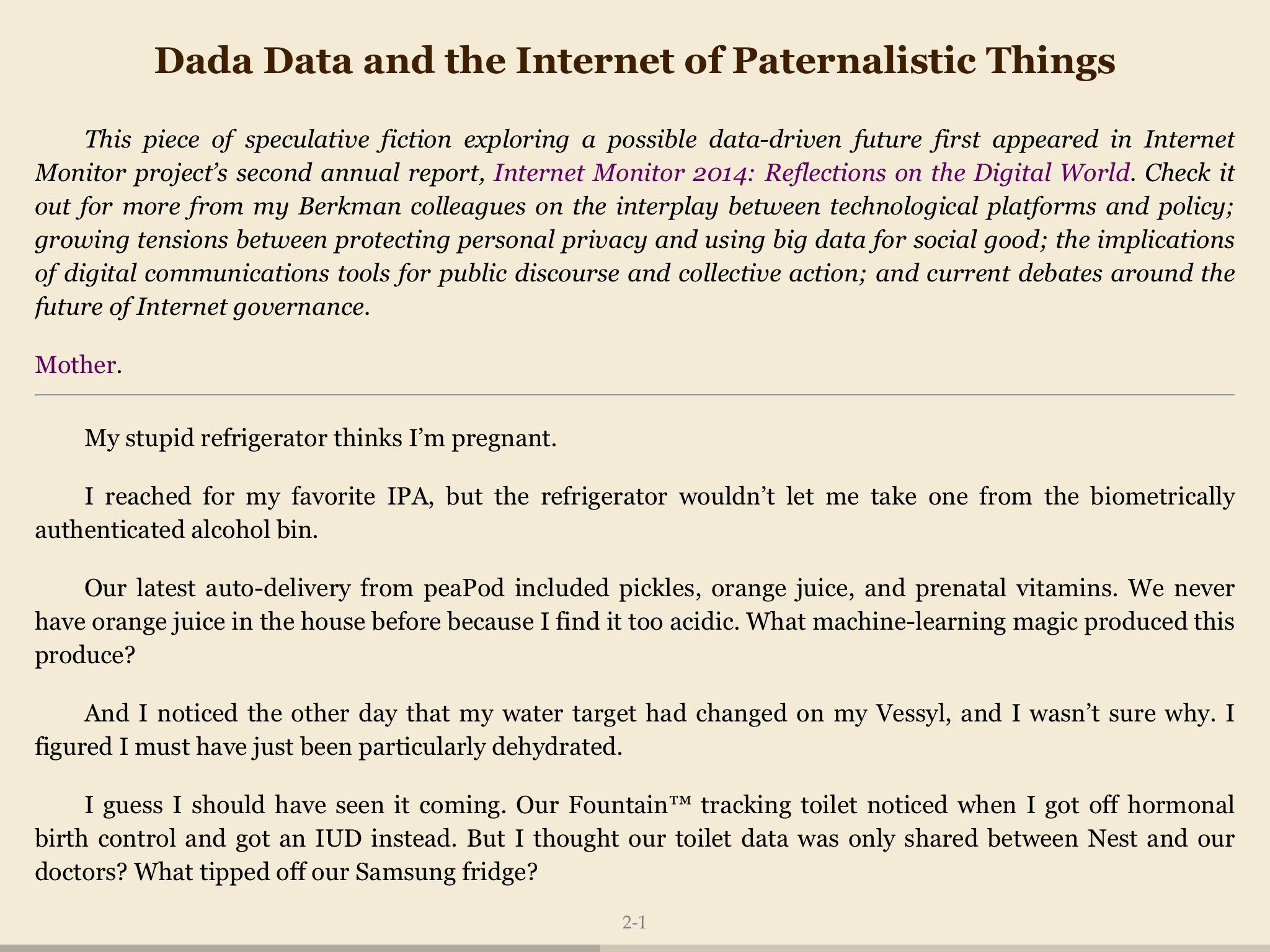
    • Dada Data and the Internet of Paternalistic Things by Sara M. Watson on The Message (Medium)

Journal articles

    • Broken-World Vocabularies by Daniel Lovins and Diane Hillmann on D-Lib Magazine
    • Recommendations for the application of Schema.org to aggregated Cultural Heritage metadata to increase relevance and visibility to search engines: the case of Europeana by Richard Wallis, Antoine Isaac, Valentine Charles, and Hugo Manguinhas on Code4Lib Journal
    • Monuments of cyberspace: Designing the Internet beyond the network framework by Paris Chrysos on First Monday

Website Converters

A web search turned up 10 websites that claimed to convert HTML into EPUB. Five of them I didn’t use:

    • Epubor Online eBook Converter — The small print on this website says that it will convert HTML, but I couldn’t enter a URL and it would not accept an uploaded HTML file.
    • Zamzar — This site requires an email address, so I moved on without even trying it.
    • 2epub — This site seems to be defunct.
    • EPUB bud — This site requires an account, so I moved on without trying it.
    • CloudConvert — Even though HTML to EPUB is listed on the site, it would only allow me to convert to PDF.

The other five websites I found all output at least one result, even if it was meaningless:

    • In-ePub
    • Online Converter
    • Convertio
    • Online-Convert
    • Go4Convert

Comparison Results

Using a Firefox extension (EPUBReader), I was able to open the EPUB files before I downloaded them to Dropbox. My initial impression of the output was not encouraging. However, since I was not planning to read them on my desktop but in an e-reader app on my iPad, I decided to withhold judgement until I had done a more detailed comparison of the files using the e-readers. I compared the resulting EPUB files in three e-readers on my iPad mini: KyBook 2, MapleRead SE, and ShuBook 2M.

I entered the URLs for nine articles into five website converters. In-ePub output a file for five of the nine articles. Online Converter and Online-Convert each output a file for eight of the nine articles. Go4Convert output a file for only one article. Convertio output a file for every single article; unfortunately, every single one of those files was empty.

None of the websites converted all of my test articles. Convertio failed the most often, with exactly zero successful conversions (also ironically making it the most consistent of the five). It simply created empty EPUB files. Online Converter and Online-Convert succeeded the most often with 8 articles each.

The simplest webpages turned into the best-looking EPUB files. But that is not saying much since the simplest webpages also produce the best PDFs. My problem is not the simple pages but the complicated ones. The EPUB converters did not (or could not?) really do any cleanup on the webpages. They did not seem to have any way to determine what on the page was relevant and what was not. Header, footer, and sidebar information often ended up being included in the EPUB file sometimes with and sometimes without the CSS that formatted it on the original webpage. This is perhaps an inherent weakness in trying to convert automatically from one format to another.

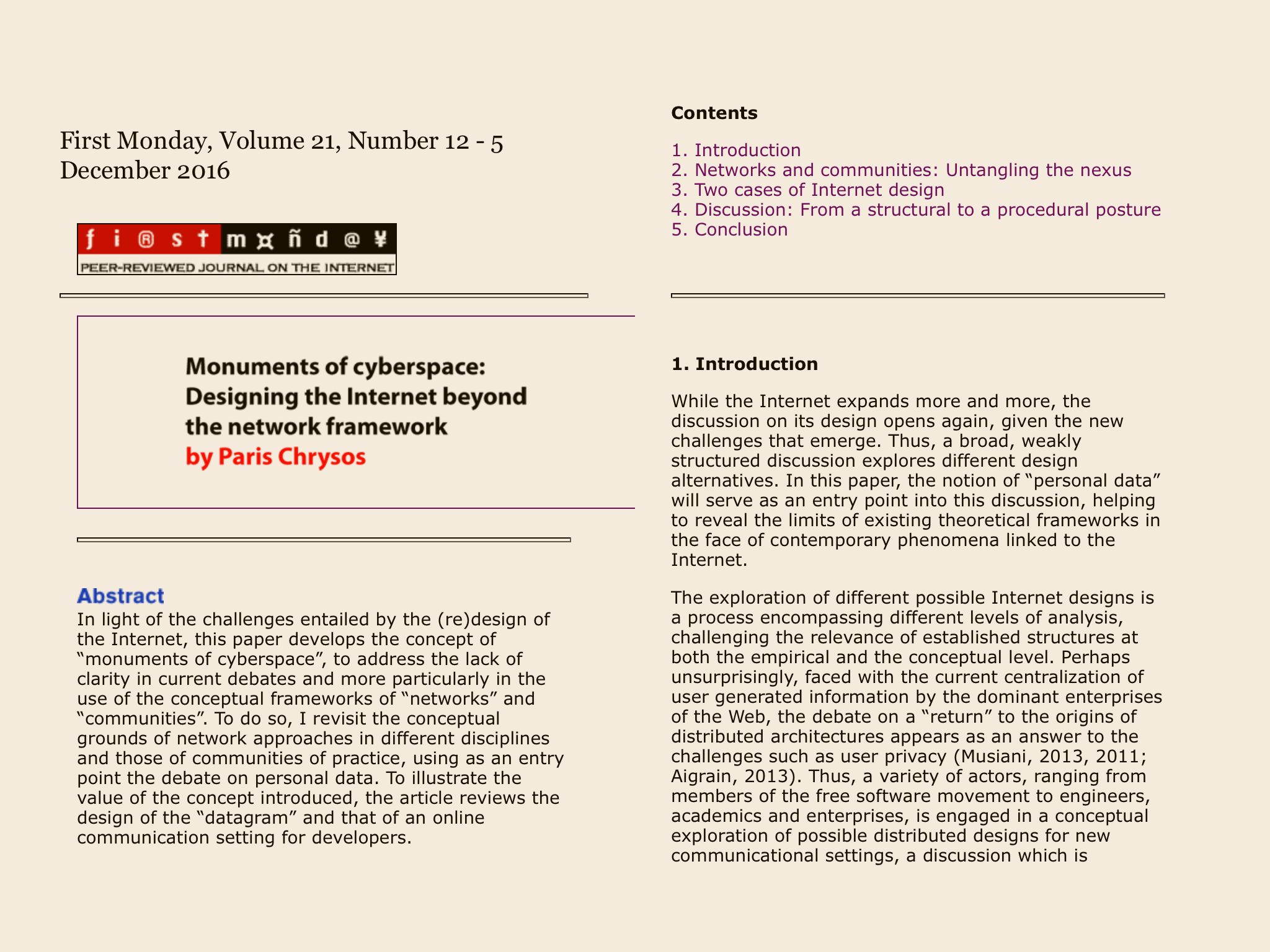
Within those basic parameters, there was some variety in the formatting applied by the converters. Online-Convert seemed to keep the closest appearance to the original webpages. This sometimes meant the articles looked the “best” in the EPUB readers but it also sometimes resulted in them looking the worst. MapleRead in particular had the most trouble with the formatting included by Online-Convert while ShuBook was the most forgiving (or possibly ignored the most webpage formatting?). The differently sourced EPUB files all looked the most similar in ShuBook.
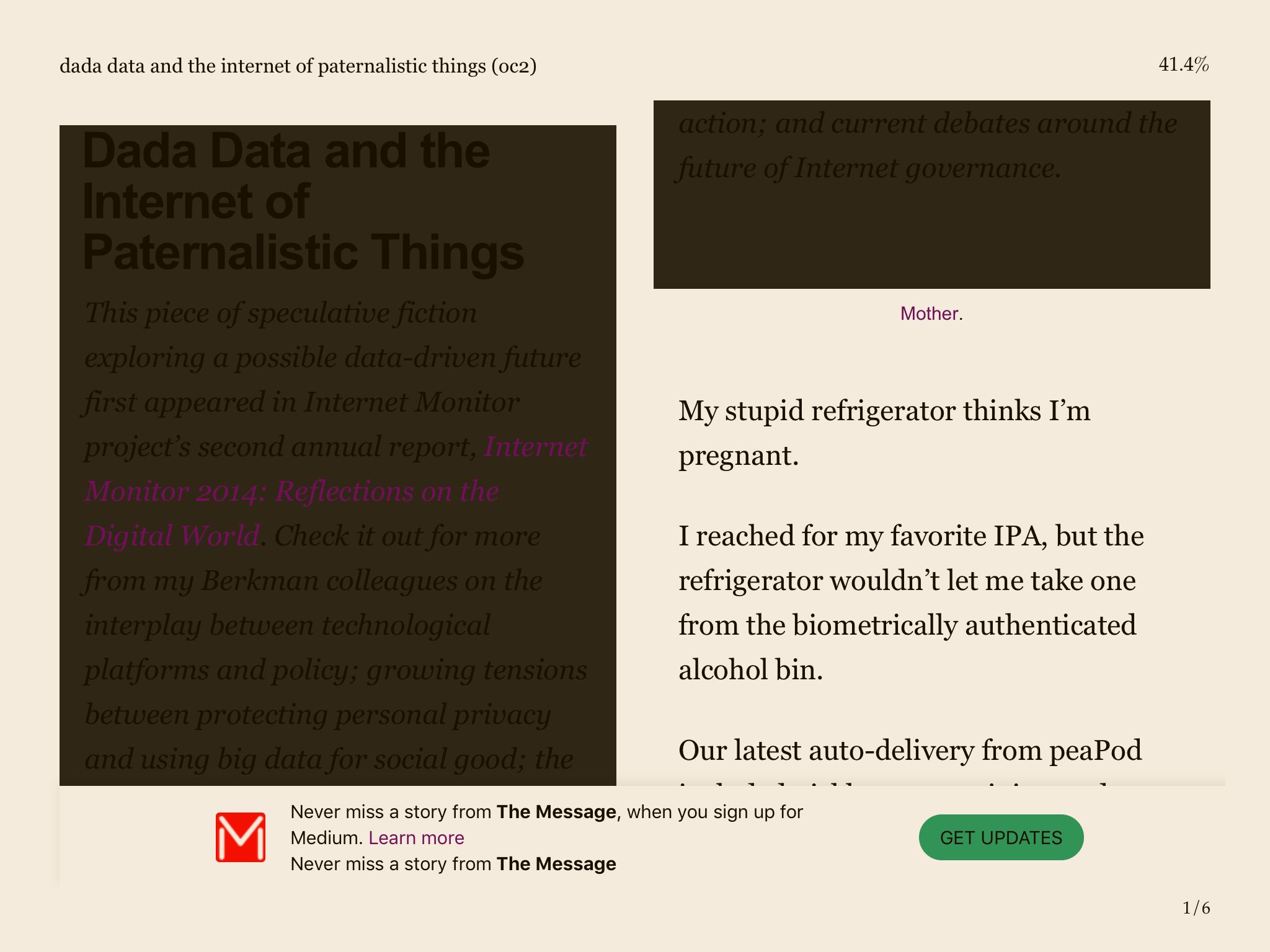
Screenshot: MapleRead's ugly display of Online-Convert EPUB file
Screenshot: MapleRead’s ugly display of Online-Convert EPUB file
Screenshot: MapleRead's nice display of an Online-Convert EPUB file
Screenshot: MapleRead’s nice display of an Online-Convert EPUB file
Screenshot: ShuBook's cleaner display od Online-Convert EPUB file
Screenshot: ShuBook’s cleaner display od Online-Convert EPUB file

Images were the biggest problem. The default settings for the website EPUB converters do not seem to include the images. This is not a problem if the image is purely decorative, but when it is a diagram or figure illustrating something explained in the text, then it is certainly a deal-breaker to not include them. In-ePub and Online Converter did not include images in the converted files while Online-Convert did. The single article that Go4Convert converted did not include any images, so I have no conclusive data one way or the other for this converter.
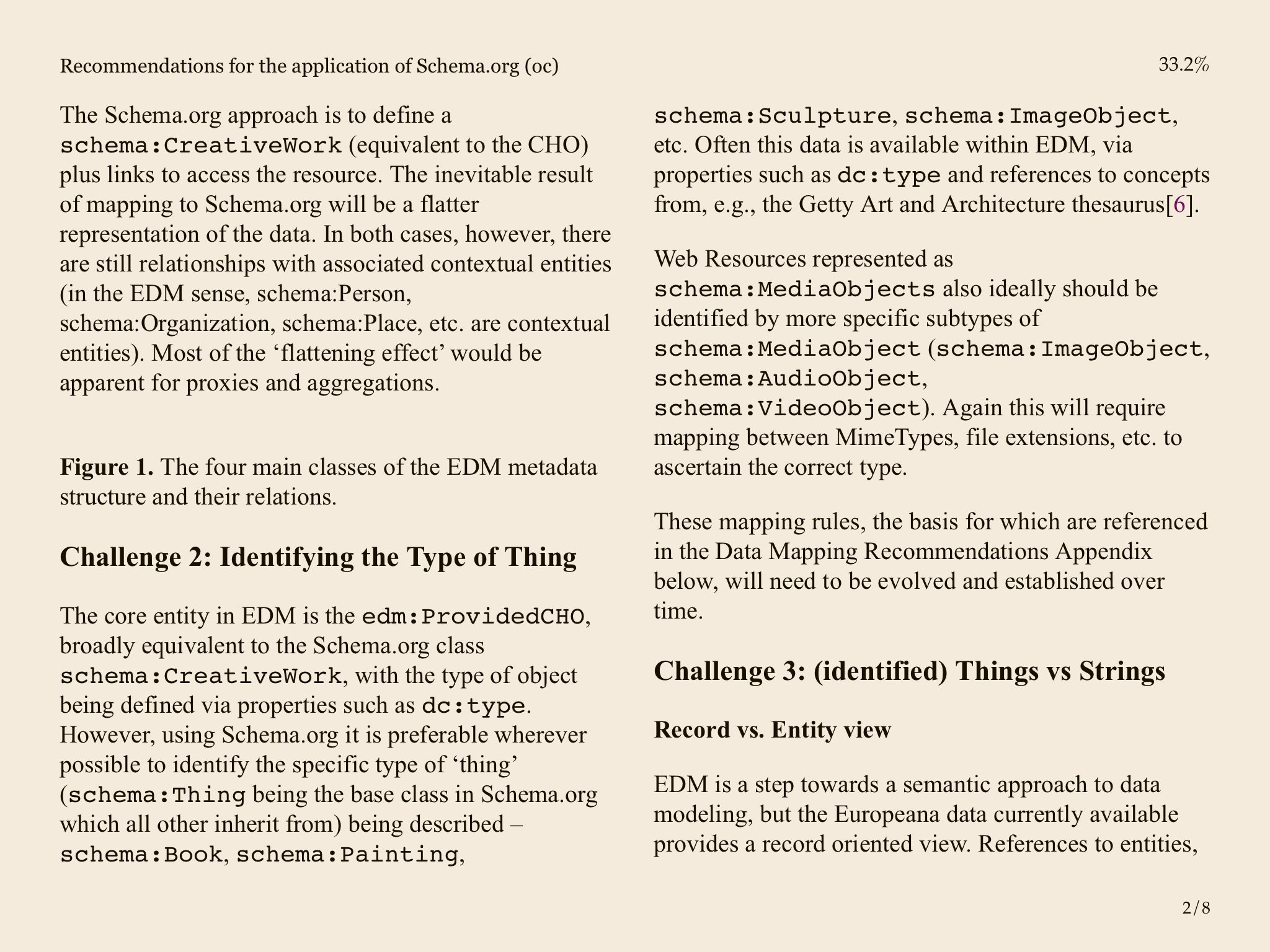
Screenshot: Text includes the caption for Figure 1 but not the image (displayed by MapleRead).

Code generally did not cause any problems. It was easily discernible; set off from the text using a fixed-width font. Unfortunately, when the files output by Online-Convert had formatting conflicts with MapleRead, the code ran off the side of the page rather than wrapping around, making it impossible to see, let alone read. ShuBook code looked the best.
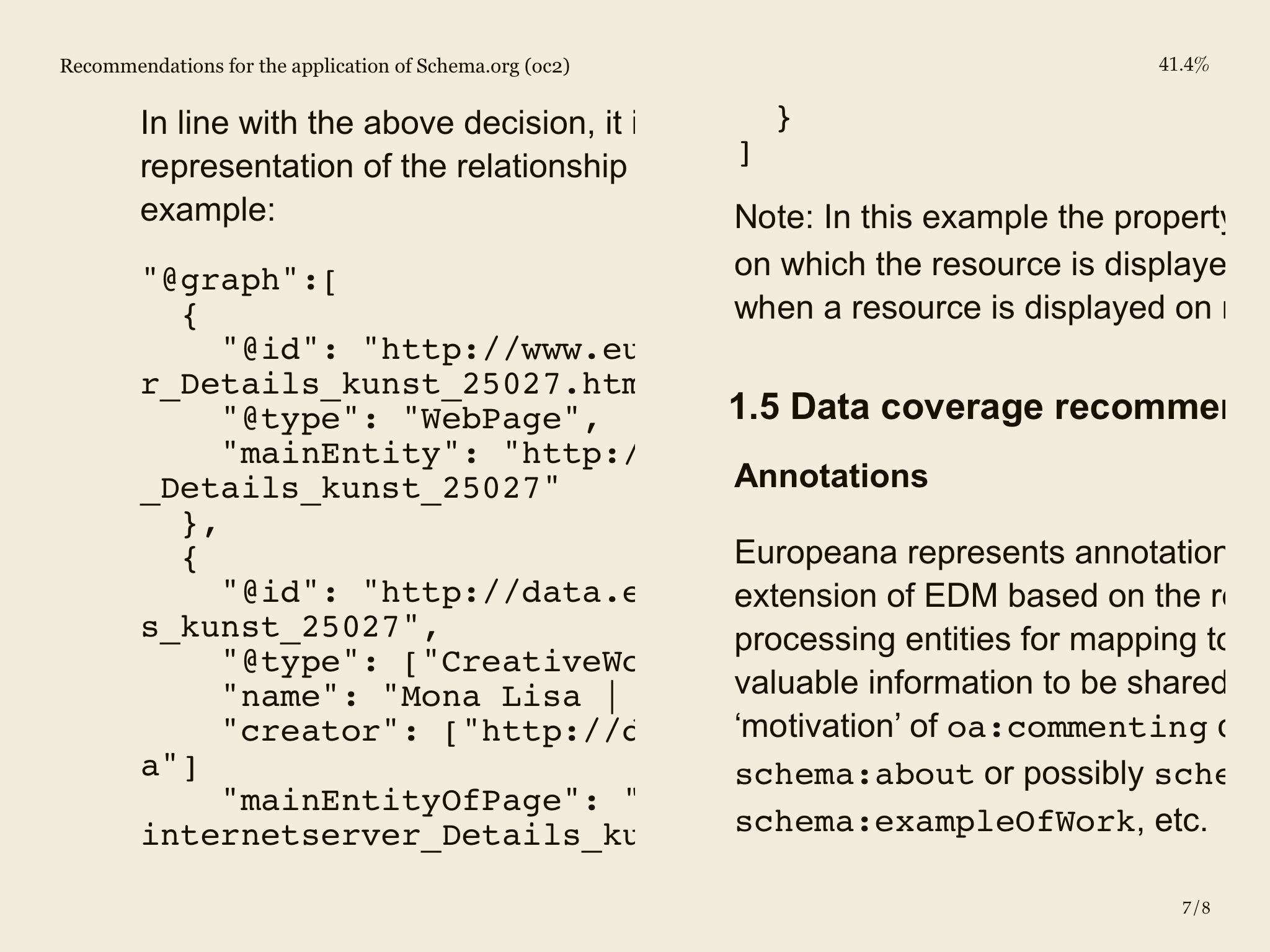
Screenshot: Code does not wrap properly in Online-Convert EPUB displayed by MapleRead

While about half of the webpages I converted allowed comments, only three articles actually had comments. Of those, only one converted EPUB file included the comments. The In the Library with a Lead Pipe article has over 70 comments which were included in the EPUB in all their glory. The Wired article includes comments but hides them by default and the phpbuilder article includes comments, but neither set of comments was included in the converted EPUB file.

Quotes and references generally did not cause any problems for any of the EPUB converters. While the exact formatting varied, both quotes and references were easy to distinguish from the rest of the text.

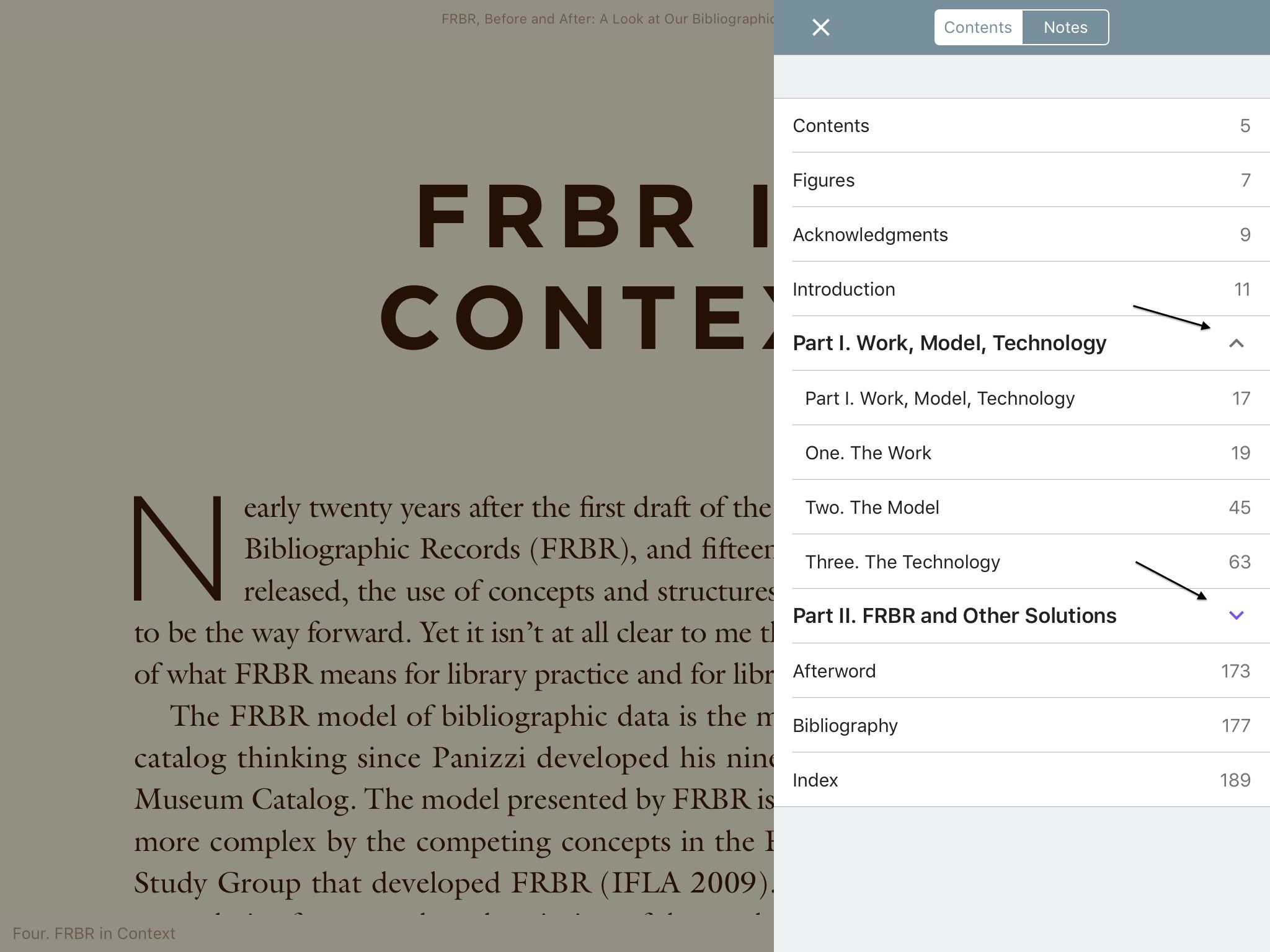
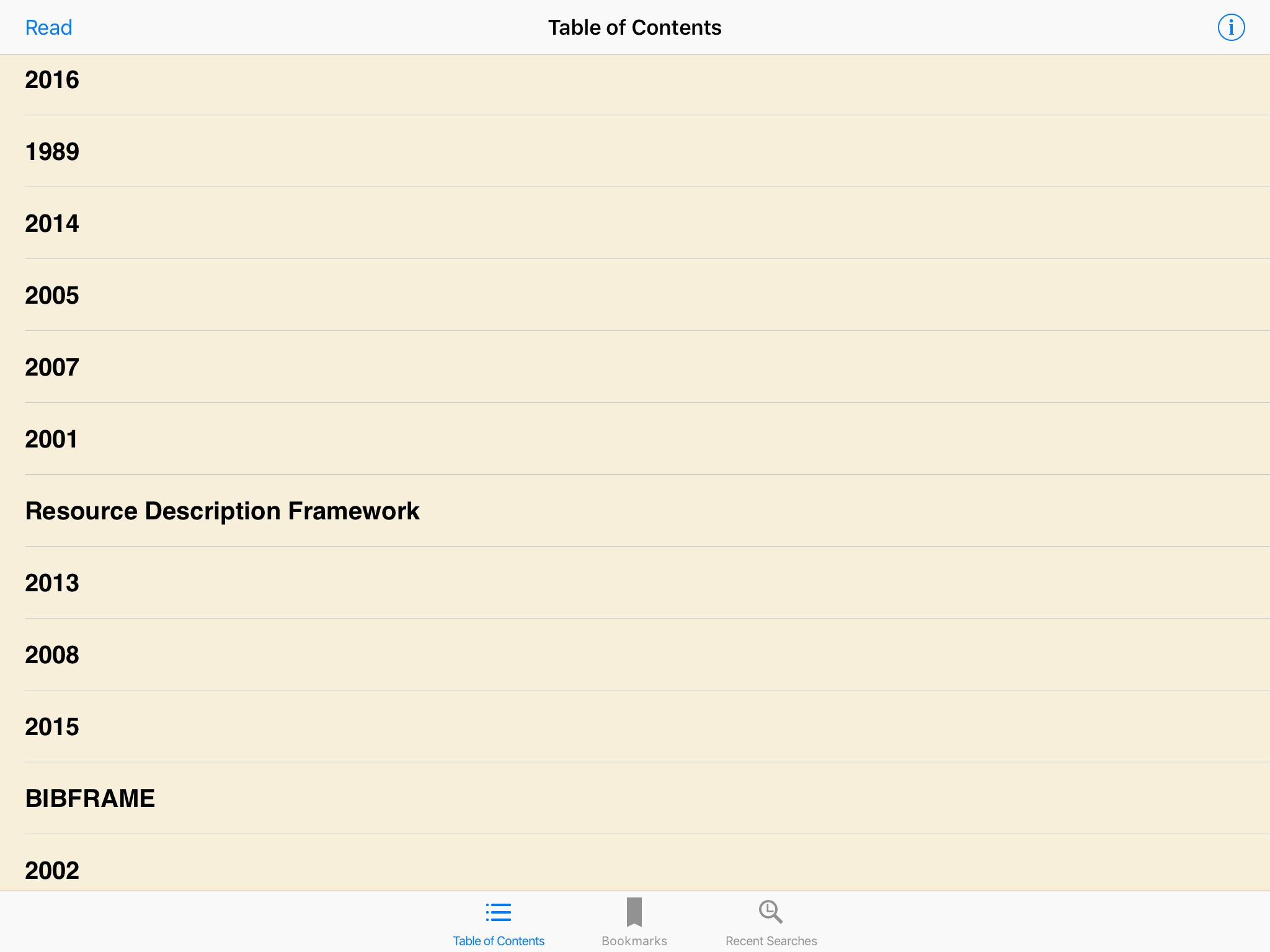
Finally, only one of the articles converted included a useful table of contents. For the rest of the articles, none of the converters produced useful output. In the e-readers, the information displayed varied from nothing to a random-looking list of entries unrelated to the actual sections of the articles. Even the EPUB file that included actual headings from the article also included a bunch of unrelated entries on the list. The output was consistent across converters; articles lacking a table of contents lacked it from all of the converters. The one article with a decent table of contents had the same list of entries from all converters. The apparent gibberish populating the table of contents for other articles was the exact same gibberish from each converter.
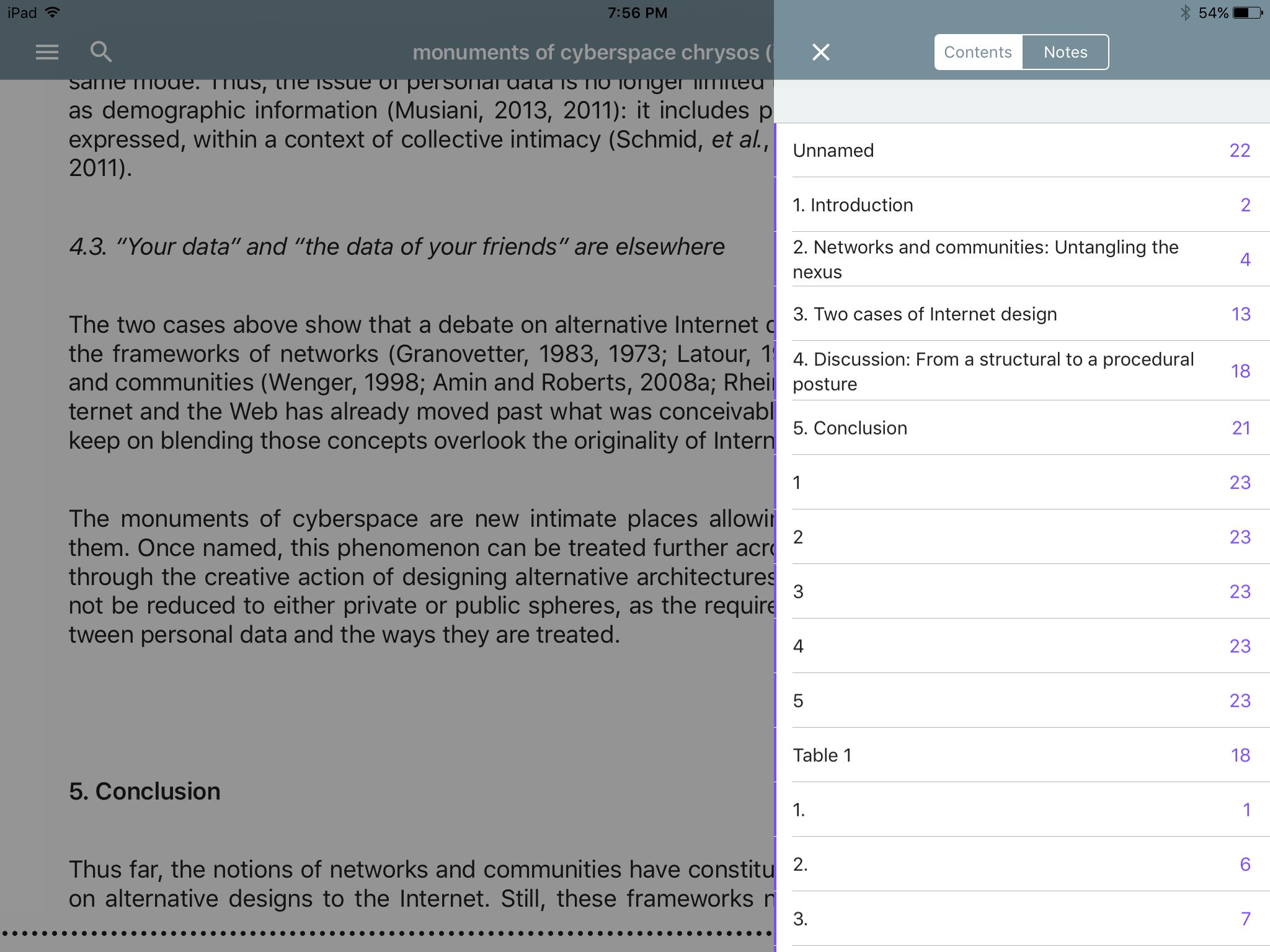
Screenshot: Table of contents with section headers from the article (displayed in Kybook)
Screenshot: Table of contents is all junk (displayed in ShuBook)
Screenshot: Table of contents created from the website header rather than the page content (displayed in MapleRead)

Conclusion

Comparing the EPUB files in my three e-readers confirmed my initial disappointment with the converted files. Converting HTML to EPUB has many of the same problems as converting HTML to PDF. There is such a diversity of ways that webpages are built that there is no one good way to catch them all. Website HTML to EPUB converters do not represent an improvement over converting to PDF for me and, in some cases, produced worse results. I am not going to use this method to convert HTML into EPUB.
Posted on May 12, 2017

Reading PDFs

Summary

I have what seem like straightforward needs. I want to be able to read PDFs that I have saved in my Calibre Library and take notes in them. It turns out that this is not so simple at all. GoodReader and Kindle do not support my local OPDS catalog. ShuBook 2M and the quite expensive (but I’m not bitter) MapleRead SE have sub-optimal note taking abilities. Right now, KyBook 2 works well for me, but my search for the “best” method continues.

Introduction

While the fiction I read largely comes from Amazon via the Kindle and other online publishers as EPUB books, the professional literature and much of the non-fiction I read comes in PDF format. I won’t get into the discussion about loving or hating PDFs. My concern here is that I need to be able to read them and take notes about them in some useful manner.

Currently, I save the PDFs (and EPUBs) temporarily to my Dropbox account and then import them into Calibre on my desktop computer so I can assign metadata and be able to actually find the files again. Calibre makes the metadata and the files available via an OPDS catalog on my local network. It seems like it should be a simple matter to import those files into my e-reader of choice. However, it turns out that to then pull those files onto my iPad mini to read them is, well, not so simple at all.

The apps

GoodReader
Cost: $4.99
I really like this app. It works great with Dropbox, so I can pull in anything that I haven’t already moved out of Dropbox. It connects with many of the cloud services. I can also connect to my computer over my local network. This is a neat feature that I, alas, do not use very often. However, it doesn’t work with the OPDS catalog and that is the deal-breaker for me.

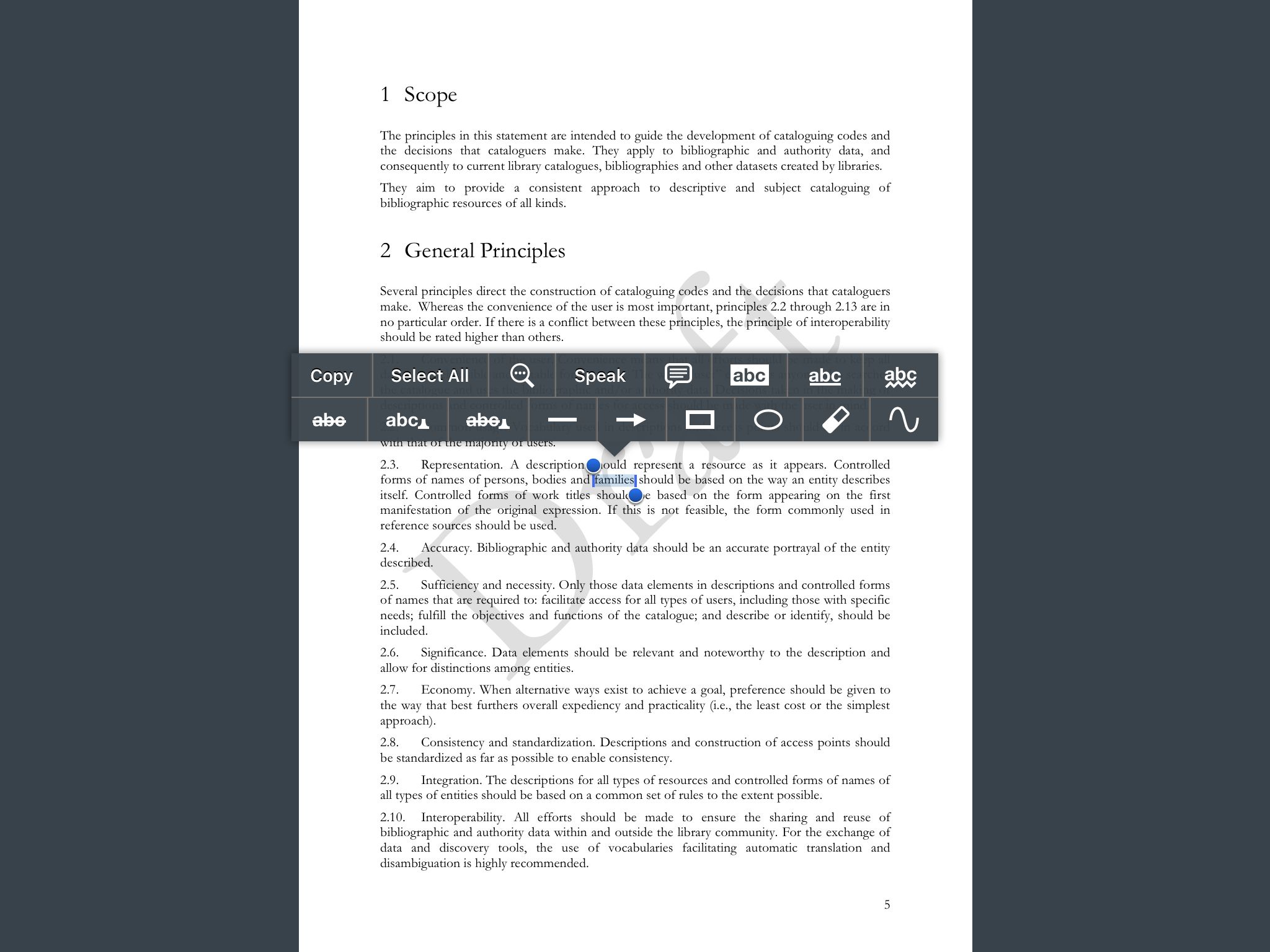
Despite that, I want to emphasize that the note-taking abilities in GoodReader are excellent. There is a plethora of tools; in addition to usual highlighting and commenting, there is underlining, strike-through, shapes, etc. GoodReader also has the unique (among the apps I am comparing here) design of saving notes as part of the document being annotated rather than in a separate notes file. The first time you highlight something, it asks if you want to “save changes to this file or do you want to create a separate copy of a file, and save changes there.” So you can have two versions of your document, one clean and one all marked up with your notes. It seems like GoodReader would be great for editing as well as note taking. I really wish I could use this app, but the lack of OPDS support makes it nearly impossible to create any sort of feasible workflow. Add-on note: This app does not seem to display a table of contents for PDFs.

Editing tools for GoodReader

Kindle
Cost: Free
Alas, this app does not work with my local OPDS catalog. I would have to add another step (or several?) to send all of the files to my kindle account, resulting in duplicated files that lack the metadata I assigned in Calibre. Nope!

ShuBook SE
Cost: no longer available?
This is an older app that I bought several years ago. It works fine with my OPDS catalog. I have mostly used it for reading EPUB books. It doesn’t work so well for PDFs. It doesn’t save my progress, so PDFs always say 0% done and I have to start from the beginning of the file each time I open it. This app has been superseded by ShuBook 2M (and ShuBook 2P). The website provides a useful comparison chart.

ShuBook 2M
Cost: $2.99
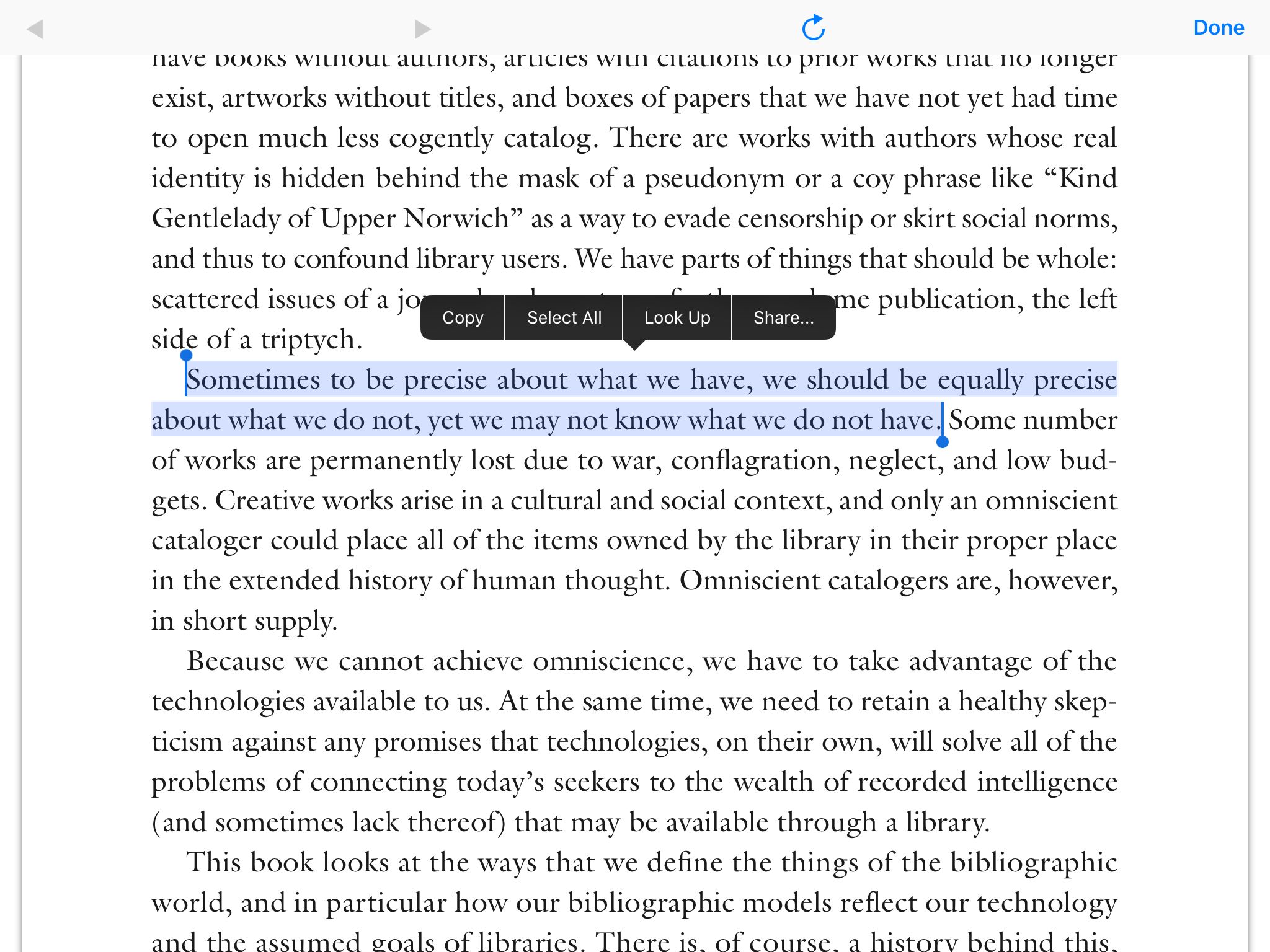
This app is better than the older ShuBook SE. It saves my progress through the PDF. There are no in-app note taking abilities, but I can highlight text and copy/paste it to an outside app (like OneNote, etc.). While that works fine, I find that the process is intrusive enough to interrupt my reading flow. So it’s not my favorite way to take notes. There is also no table of contents for PDFs in this app. I like this app but it works best with lighter reading where I don’t need to take notes.

Editing tools for ShuBook 2M
Editing tools available for ShuBook 2M

MapleRead SE
Cost: $5.99
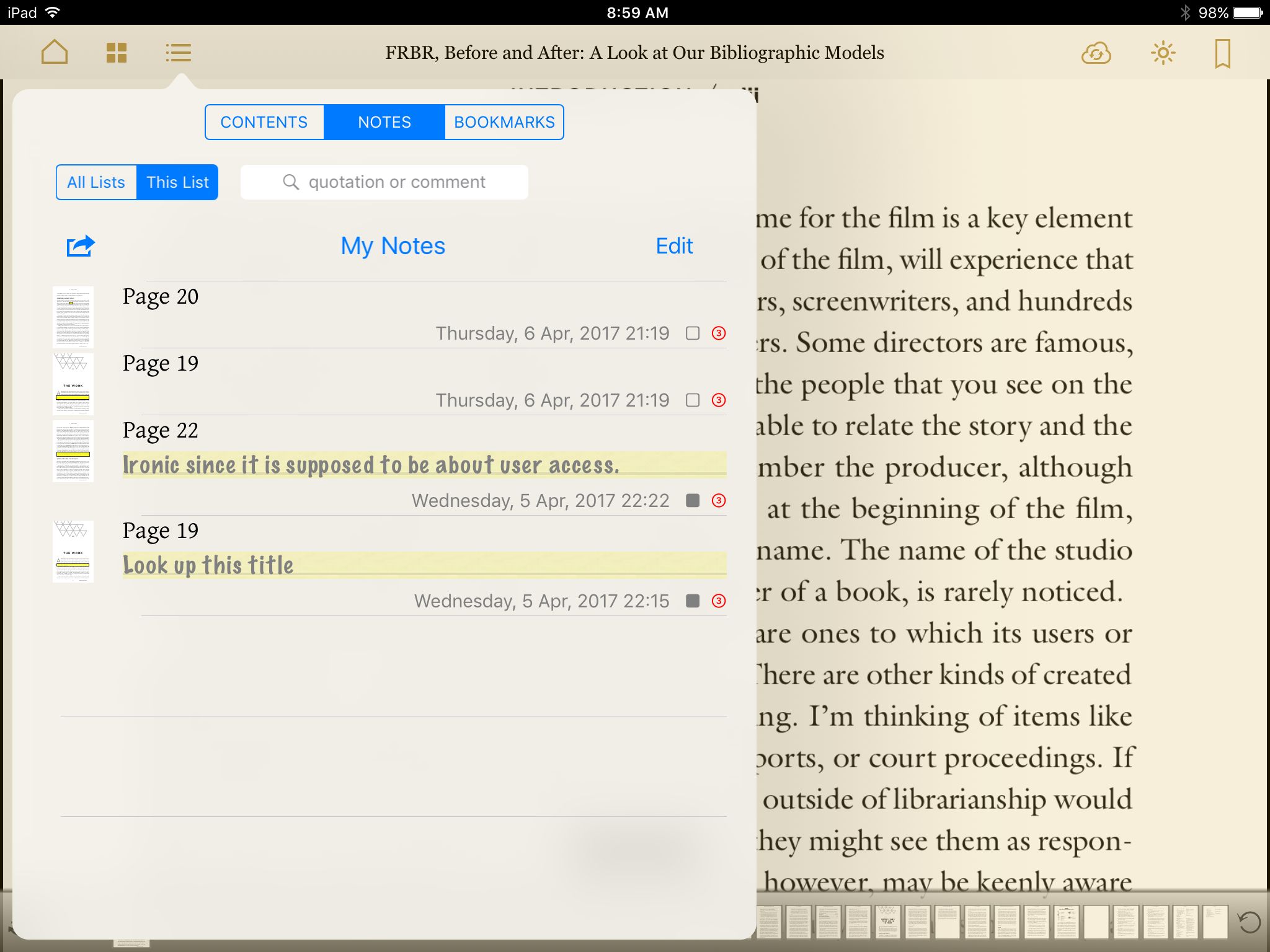
This app was a huge disappointment. It touts its note taking abilities (and charges heavily for them too), however, that apparently only applies to EPUBs and not not to PDFs at all. This app provides the worst experience of the apps I have looked at thus far for reading PDFs. Downloading them from my OPDS catalog worked great but PDFs are images only in this app. The website says “Note-taking including marking (highlighting) as images and commenting with 3 priority levels”(emphasis mine). That means no ability to highlight text at all. No dictionary look up, no text saved to notes, and no copy/paste to an outside app. I can draw a box on the page to mark it but that is it. Looking at my saved notes, I cannot see anything except that I marked something on page X. If I add comments to the marked box, I can see those, but that is not useful if I can’t also see the text that I commented on. Finally, while it has a VERY nice table of contents, there is no apparent way to export notes.

Notes saved in Mapleread

KyBook 2
Cost: Free/$3.99 in app upgrade
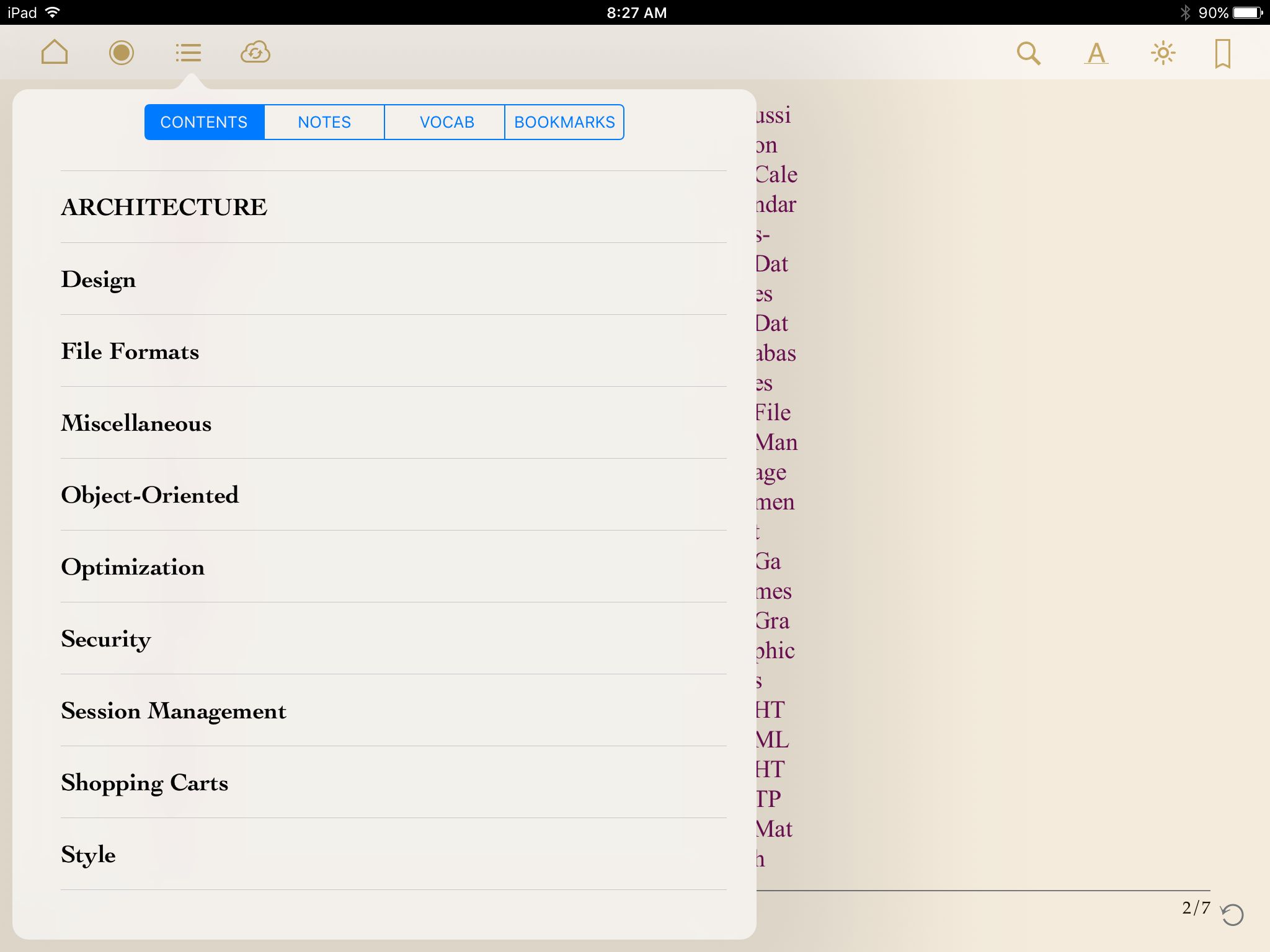
So far, this one has worked the best for me. Downloading from my OPDS catalog is easy. And this is the first app I’ve used that actually remembers my OPDS catalog from one use to the next. All of the other apps have to scan the network each time to rediscover it. Reading progress in PDFs is saved. Note taking is super easy and I can export the notes to an outside app once I am done reading the book. This app also has an interactive table of contents. Currently, this is officially my go-to reading app for PDFs.

Table of contents in KyBook 2
Table of Contents in KyBook 2

Conclusion

This is an ongoing project (as they all are). Thus far, I think I have spent more time hunting for the right methodology than I have actually spent reading. Stupid internet! *Shakes fist angrily* I am collecting [all those cataloging and BIBFRAME] articles and [other non-fiction, like Anatomy! and Economics!] books faster than I can actually read them. Another method that I need to explore is converting PDFs to EPUB. This is easily done in Calibre. I have tried it in the past and was not impressed with the results. However, I will try it again because I am also just not satisfied with the usability of the PDFs. Another interesting idea to try is converting the HTML articles I find into EPUB rather than PDF.

One final thing to note here is that each of the reading apps above has a different interface. Learning how to use one app will definitely not help you to figure out the next one, it might even make it harder to figure out. Comments in the support forums for every single one complain that they are not intuitive. I suspect that “intuitive” in this case is shorthand for “that is not how my brain would organize things.” In any case, I have found that spending the time to click all the buttons (what happens when I tap that icon?) is the best way to figure how the app is organized.

Posted on August 6, 2015August 6, 2015

Digital Music Organization and Archiving

When I first considered writing this up, my first thought was that it wasn’t related to cataloging. But really, like many of my projects, it actually is. I am all about the information organization and having good metadata no matter what I am doing. So here it is.

Recently, I ran out of space on my ancient iMac’s 500 GB hard drive. I have thinking for quite awhile now about shifting my media off the internal hard drive and onto an external drive array of some kind; specifically so I could add more media. Fortunately, we had a Drobo sitting around begging to be used. Now I have 2 TBs of space that is expandable to 8 TBs! All that space! Let the ripping, er, archiving commence!

First question: What format should I use?

Being firmly planted in the Apple camp, of course I use iTunes as my media player, so I need to have my music in a format that it can use. I have ripped music to mp3s previously and I know that there is a newer format that iTunes uses as the default for purchased music. But I also vaguely know that these are not “perfect” versions, that they are compressed to save space, etc. So what about an “archival” version? Is is possible to rip an exact duplicate of the CD version of the music?

I discovered that there are basically three types of music files: uncompressed; lossless, compressed; and lossy, compressed. The uncompressed files take up huge amounts of space but are exact replicas of the original CD. I guess this would be the ultimate “preservation” file, assuming I had the disk space for it. A lossless, compressed file also exactly replicates the original CD though, so I think this is probably a better choice for me. Someone else might have some sort of specific reason to choose uncompressed. The lossy, compressed file seems to be a good choice for the “access” version of the music.

My research revealed two main types of uncompressed formats: WAVE and AIFF. WAVE (Waveform Audio File Format) is used primarily by Windows computers and AIFF (Audio Interchange File Format) by Macs. I didn’t investigate these formats any further as my focus was on the lossless, compressed file types.

The Wikipedia article “Audio file format” discusses several lossless, compressed formats and further searches narrowed my interest down to two: FLAC and ALAC. FLAC stands for “Free Lossless Audio Codec” and ALAC stands for “Apple Lossless Audio Codec”. I’ll cover these in more detail below.

Finally, there are many lossy, compressed formats, but again I quickly narrowed my interest down to two: mp3 and AAC. These also I did not pursue very far in my research. Despite being the defacto standard for digital music, it turns out that the mp3 format is actually encumbered with a jumble of licensing issues. However, the adoption rate for this file format is high enough that, not being a developer, the messy licensing would probably never be an issue for me. AAC is the format that iTunes uses for music downloaded through its store. Additionally, I learned that iTunes saves AAC DRM’d files as m4p and AAC unprotected files as m4a; and as an iTunes Match subscriber, I can get my (handful) of m4p songs updated to m4a.

As an aside to this discussion about “which format?”, I learned that file format (i.e. container) and codec are not necessarily the same thing. Often a codec uses a particular file format but that is not always true. For example, FLAC can be encoded in its native container (with a file extension of .flac) or in the Ogg container (with file extension .oga).

FLAC is open-source and supported by a range of software and hardware. Everyone on the internet, (by which I mean the posters in the audiophile forums that my search results turned up[1]), seems to have generally positive things to say about FLAC. Alas, it is not supported by iTunes. But that is okay; at this point in my research, my thought was that I could use this as my “preservation” format and transcode the files into a lossy “access” format (for the smaller file size) that iTunes can use.

The objections around ALAC seem to center mainly on it being proprietary (and/or because it’s Apple) and the fact that it won’t transcode 24 bit files back out of ALAC again[2]. It turns out that while the codec was originally proprietary, Apple released it as open source in 2011. So that is now a non-issue. As for the 24 bit transcoding problem; according to Wikipedia, audio CDs are 16 bit, while audio DVDs can be up to 24 bit. I am only ripping CDs at this point, so the 24 bit transcoding problem seems like a non-issue for me. Obviously, if I should want to rip audio DVDs in the future, I would need to revisit this issue and do some more research (DRM is also an issue for audio DVDs). For 16 bit files, the audiophile forums discussing the topic assert that there is no difference in the quality of files produced by ALAC versus FLAC.

In sum, I found that FLAC is supported in more places than ALAC, but ALAC is supported by Apple. Using ALAC would also allow me to rip the music into just the one lossless format, instead of needing separate preservation and access formats.

Question: Would using ALAC lock me into iTunes as my only alternative?

More research revealed that there are several tools for converting between ALAC and FLAC. ffmpeg was the most commonly mentioned (also, free!), but others I saw frequently mentioned were dBpowerAMP and XLD.

Question: What about the metadata?

This took a bit more careful searching (and some reading between the lines) to discover the answer. The metadata was not really explicitly discussed very often. I think that “everyone knows how it works” so it is not really discussed, or people just jump right in and try it out, so they don’t ever need to ask (or they don’t care?). In any case, the sense that I got from the discussion boards was that, yes, the metadata is transcoded along with the rest.

However, there seems to be an issue with album covers. This isn’t really an issue for me as I have never made any effort to include them, but it is something to be aware of. It is not really clear to me, but I think that if the art is embedded in the metadata (requiring some effort on the part of the user), it will be transferred. But, if the art is only linked to the metadata, then it will not be transferred. I believe that iTunes’ default is to link rather than embed. I have not researched how or if it is possible to change linked art to embedded art within iTunes.

Conclusion

So the answer is fairly simple for me: use iTunes to rip my CDs into ALAC. I’ll have a lossless, compressed file that works just fine with iTunes and can be transcoded fairly easily to another format at a later date without any loss of fidelity. The next step is the hard one – actually doing it!

A note about my research process (because I care about that sort of thing)

I did all of my research on the internet. From a general internet search, I started with Wikipedia articles. These gave me the basic keywords and understanding that I needed to ask more specific questions. The answers to those questions, I found on blogs and message forums, and in the documentation for the software/codecs/file types. This was a fairly straight-forward question that I basically spent an afternoon researching. Writing this blog post, on the other hand, has taken at least four times as long. Organizing a coherent explanation that cites all of the appropriate sources apparently takes me much longer than just making a decision based on those sources.

Notes

[1] In researching differences between FLAC and ALAC, I found several forums that discuss it.
Head-Fi Forums
Hydrogenaudio Forums
Linn Forums

[2] This discussion on the Stereophile Forums specifically addresses the 16 versus 24 bit issue.

Posted on February 2, 2013

Reading Notes: A reconsideration of mapping in a semantic world

Article citation:

Dunsire, G., Hillman, D., Phipps, J. & Coyle, K. (2011). A reconsideration of mapping in a semantic world. Proc. Int’l Conf. on Dublin Core and Metadata Applications 2011, 26-36.

Summary:

Dunsire, et al. discuss earlier methods of cross-walking metadata and compare it to the type of mapping potentially available in an open Semantic Web environment.

Quoted abstract:

For much of the past decade, attempts to corral the explosion of new metadata schemas (or formats) have been notably unsuccessful. Concerns about interoperability in this diverse and rapidly changing environment continue, with strategies based on syntactic crosswalks becoming more sophisticated even as the ground beneath library data shifts further towards the Semantic Web. This paper will review the state of the art of traditional crosswalking strategies, examine lessons learned, and suggest how some changes in approach–from record-based to statement-based, and from syntax-based to semantic-based–can make a significant difference in the outcome. The paper will also describe a semantic mapping service now under development.

Discussion:

Dunsire et al. begin the article by talking about the large amount of legacy data in various formats that has been generated and the need to crosswalk the data between those formats. In the traditional cataloging environment, data values have to be translated from one closed system based on a single metadata standard to another closed system based on another different metadata standard. So the elements have to be mapped between the systems and then the data values transformed between the systems to match different constraints of the elements in each system. Unfortunately, problems occur when the elements in each system do not have exactly the same meaning. There is no way to translate “approximately” when building a traditional crosswalk.

Additionally, the mapping of elements between systems is normally done separately from and outside of the method used to transform the data values.

Maps are developed, ingested and maintained as documents (usually spreadsheets) that are not actionable. Thus a further, but separate, step beyond the intellectual process of creating a map is the creation of programs that implement the mapping and transform data based on the decisions made during the creation of the maps. (p. 27)

They propose instead using RDF as a basis for developing maps.

What occurs to me though, is that the legacy data, by definition, cannot exist in the RDF/Linked Data world because it is just strings. Without the linkages, it is invisible. I wonder, does this mean that someone(s) must create metadata elements that correspond to the MARC fields and subfields to allow the relationships (maps) to be built? I think that something like this is happening in the Open Metadata Registry. I also think this is part of what Karen Coyle is always trying to get people to think about, but I am too lazy to go search for references right now.

Dunsire at al. discuss existing cross-walk strategies used for legacy data. Existing cross-walking strategies are generally top-down and include “pairwise” or “peer to peer” and “hub-and-spoke” or “switch” strategies. Pairwise strategies have only a one-to-one equivalency between element sets, this is their great weakness. Switch strategies allow more nuanced linkages but at the cost of an extremely large vocabulary.

Most existing crosswalks implement a peer to peer strategy. Because there has to be a one-to-one equivalence between the two mapped elements, there is no way to express “almost the same”. Switch strategies get around this by using a central vocabulary that can be used between any other two sets of elements. Unfortunately, this results in an extremely unwieldy (and ever-expanding) vocabulary to manage all of the possible equivalencies between all of the elements.

Dunsire et al. envision a process where elements can be related to each other in an ad hoc way through a series of RDF graphs.

A mapping is made to an appropriate existing RDF graph using OWL equivalence properties, as with a switch vocabulary in the top-down scenario. However, that graph need not, in itself, contain a mapping to the target vocabulary. Instead, the graph is “mapped” or connected to another graph, and so on until a graph containing the target concept is reached. (p. 28)

But this seems like it could be problematic to me. Is it the friend of a friend problem? When A knows B and B knows C, does C know A? Or this a problem with my thinking because I am going back them being equivalent rather than just somehow related? Because I am using the same relationship between A to B and B to C. So, if A knows B and B has heard of C, how are A and C related? Maybe not at all. Certainly, no assumption can be made about the relationship of A and C based on the relationships between A to B and B to C in this case. I think that without tight controls on the system, this process could easily go off the rails.

They specifically state that the mapping should be done with “OWL equivalence properties” so maybe I just need to go look at the OWL documentation to better understand how this type of mapping would work. The OWL documentation has been on my to-do list for awhile now, along with many, many other things. *sigh*

Also, the relationship between any two elements still has to be pre-defined, so in that sense, it is not really any more ad hoc than the switch vocabulary setup.

In an RDF environment, we can create relationships between the elements and use all elements (regardless of origin) together rather than translating the data value contained in one element to a different value for a different element in a different set.

In an open, non-transformative world, mapping applications can choose to treat all relationships as statements of equivalence or near-equivalence, or they can make use of more complex relationships in their applications. (p. 30)

Dunsire et al. give the example of DCMI’s Simple DC and DC Terms. These are two separate sets of elements that are related by property and subproperty.

The important thing to note is that the data values can stay the same, they are not required to be transformed into a different form for a different element set. They stay in their original element and the elements themselves have defined relationships within the system. So we end up with a collection of elements from different sets all being intermingled together rather than elements from just one set. For example, rather than having a MARC “record” to display, we might have a display assembled from individual elements taken from Dublin Core, RDA and FOAF. Hmm, it will be interesting to see how data storage in this new environment shakes out.

This mapping is done at the RDFs/OWL/SKOS level as part of the software programming. Setting up the semantics would not really be an on-the-fly sort of thing. But at the same time, it means that the whole process is integrated into one package together without the need to maintain separate documents in multiple places. I really like the idea that, even if transformations of the data values do take place, the original semantics of the elements/values would not be lost since it would all be connected within one application.

Dunsire et al. propose mappings be built on the relationship of one element refining another element; in the same sense that dct “dateCopyrighted” refines dc “date”. They don’t have exactly the same meaning, but they are related. How this might work is demonstrated in a figure showing possible relationships between the element “extent” in various element sets. I can see lots more wrangling over semantics in our future.

But I don’t think that a system that does this actually exists anywhere yet. They discuss how a toolkit/application would need to support the process of building the relationships by providing suggestions and constraints for users trying to map various properties. Maybe the eXtensible Catalog does some of this?

Dunsire et al. state that there is no need for authoritative mapping. Any given element can map to differing semantics at the same time. They cite the fact that are two versions of FRBR defined in RDF. This makes my cataloger’s heart want to curl up and hide. La, la, la, la, I can’t hear you! It sounds like chaos, but in reality, probably not. Conflicting semantics won’t be used in the same application and possibly not even in the same community (though this where the wrangling over semantics might come in again). Anyone can do anything, but that doesn’t mean that I have take everyone into account when I do my thing. So the “authoritative mapping” will still exist, but more likely, I’m guessing, as a consensus locally or within a community.

Finally, Dunsire et al. note that while the mapping process in the RDF environment is fundamentally different, it is still not a simple process. Many of the same problems still exist in the new environment.

There are issues of provenance and authorship of the map, version control and change management over time, the editorial and publishing cycle, management of group authorship and roles within the group including discussion and voting, and even evaluation of the validity of individual mapping statements based on the declared domains and ranges of mapping predicates. (p. 33)

The Open Metadata Registry is being developed to support this functionality for users to do this kind of semantic mapping between elements. Assuming that the eXtensible Catalog has mappings, I wonder if they allow or plan to allow administrative users (not the end-users) to add custom mappings into the system.

Dunsire at al. finish the article with four questions for further discussion:

• What will be the relationship of Application Profiles, specifying how sets of data elements should be assembled into packages or “records” for particular applications, to this ecology of mapping? Will communities wish to designate mappings that reflect their metadata point of view?

• We see the value of mappings as independent ontological statements with visible authority and ownership separate from the originating ontologies. Is there a value too, to formal endorsement in this environment?

• How does the mapping of individuals in value vocabularies fit in? Can these techniques be applied to value vocabularies in a useful way? Is the value different or less?

• What is the value of metadata registries such as the Open Metadata Registry, id.loc.gov, the Dublin Core registry, and vocab.org, in this environment. Can tools based within those registries encourage the growth of this environment? (p. 35)

Posted on July 24, 2012July 24, 2012

ALA 2012: Linked Data & Next Generation Catalogs Session – Part 2

“Linked Data & Next Generation Catalogs”
8am on Saturday, June 23, 2012
The speakers, in order, were Corey Harper, Phil Schreur, Ted Fons, Yvette Diven and Jennifer Bowen.
Presentation slides at: ALA Connect: Next Generation Catalog Interest Group

Part II: Ted Fons, Yvette Diven and Jennifer Bowen

“A View of OCLCís Strategy: Linked Data”
Ted Fons

Ted Fons discussed how OCLC is implementing Linked Data technologies.

OCLC is implementing schema.org markup on their webpages and has developed an extension beyond the basic bibliographic vocabulary provided by schema.org. OCLC has begun this to improve SEO for Worldcat and libraries, to strengthen the WorldShare Platform with a tangible new offering, to gain a position of authority in modeling post-MARC data, and to promote internal efficiency (slide 5). The ultimate objective is to position OCLC as a leader in the library community, at the forefront of Linked Data technology (slide 6).

How We Got to Linked Data
Fons gave an overview of the timeline that lead to OCLC’s implementation of schema.org markup and of schema.org (slide 8).

Using the schema.org markup allows OCLC to assign URIs to “library things” in a way that facilitates re-use of the data by other entities outside the world of libraries, such as the search engines.

Future of Cataloging
Fons characterized traditional cataloging as all about the local catalog. It includes description and limited use of authority files and is about “locating the resource in the local catalog context” (slide 16). The future of cataloging takes that and allows expanded use of authority files, not just library-specific ones, and locates the resource “within a network of useful links” (slide 17). Cataloging will still be core to the library, but becomes an even more important source of authoritative data within the context of the web.

Fons concluded his presentation by noting that OCLC is positioning itself on the forefront of Linked Data research, that integrating with the rest of the Linked Data world will allow libraries to become major hubs and that the use of schema.org represents a major step for OCLC members.

———————————–

“Stories and Lessons from the Road to Linked Data”
Yvette Diven

Yvette Diven discussed Serials Solutions’ foray into Linked Data.

Diven began with an overview of Serials Solutions (SS). SS was founded specifically to provide authoritative metadata for libraries. At its core is a “centrally-provisioned Knowledgebase” (slide 2, notes). The knowledgebase started as an industry-standard flat file and has evolved from there.

The metadata imported into the repository comes in various formats including MARC, DC, XML, ONIX, text, etc. It is cleaned up and integrated into the services provided by SS.

Linked Data
Starting with this knowledgebase, they have chosen FRBR to use as the conceptual framework and RDA as the schema. The data is loaded into a separate relational database that is not a MARC database. MARC data can come in and go out, but it is not internally stored as MARC data. This provides more flexibility for importing and exporting is multiple formats.

Serial Solutions’ new service Intota will be based on this new data framework and should be able to support the entire life cycle of the library’s collection as well as providing Linked Data benefits to service users.

Diven stated that one lesson they learned about moving towards Linked Data was to start simply, like with controlled vocabularies.

Future pilot projects include publishing knowledgebase data as RDF/RDFa triples and including open access journal data and data from Ulrich’s.

————————————-

“‘Linked-Data-Ready’ Software for Libraries: The eXtensible Catalog (XC)”
Jennifer Bowen

Jennifer Bowen discussed how XC can facilitate the move to Linked Data.

Bowen noted that there are many questions surrounding Linked Data:

  • Why should we do it,
  • Who should do it,
  • How can we get started
  • and What are the outcomes?

Bowen asked if Linked Data could help us provide what our users need and if there are new roles for libraries. As part of the process of building XC, they performed user studies that might help answer these questions. The results of that research are available in the book Scholarly Practice, Participatory Design and the eXtensible Catalog.

The user studies showed that, first, scholars want:

  • to read everything on the topic that they are researching
  • to be in the middle of everything they need, with it all organized so it is findable and useable
  • their research to be findable and usable by others
  • to connect with people whose work is interesting and useful to them

Finally, the user studies found that scholars don’t care about the technology as long as it works.

Second, the studies showed a shift in how people seek and use information. Library-based systems (website, catalogs, etc.) are being bypassed, not only in favor of Google, et al., but also in favor of “tailored desktop, mobile, and web applications” (slide 10). Furthermore, even if they use library-provided tools to identify resources, scholars go outside the library domain to analyze their information.

The solution to this is to make library resources discoverable where users are looking for them: search engines, mobile apps and social media. Bowen noted that libraries could build their own tools and applications, but if they simply concentrate on making the data usable, someone else will happily build these types of tools.

Who should create Linked Data? Why create Linked Data?
Bowen stated that any/all libraries should be working on Linked Data. Libraries need to change to a new data paradigm and they need hands-on experience with Linked Data both to understand its potential and to develop best practices. Linked Data provides an opportunity to showcase unique local collections and serve local interests. Libraries also need to get started with Linked Data so that they can push their vendors to start thinking about Linked Data now and not at some amorphous point in the future. Finally, Linked Data will allow libraries to create or take advantage of new opportunities and explore new roles.

How can we get started?
To get to Linked Data, we need tools to convert legacy data into Linked Data. Bowen discussed how XC might be one such tool. XC is open source and provides both a discovery system and a set of tools to transform and manage metadata. This provides a platform for metadata transformation experimentation (and potentially for Linked Data) that is risk-free. It allows bulk conversion of existing library metadata and can synchronize data conversion to existing systems.

While not built with the idea of Linked Data in mind, XC could potentially be used to make Linked Data available to developers. Bowen envisions the User Interface (Drupal Toolkit) and the Metadata Services (MST toolkit) as being the main components for creating the RDF. The user interface could generate RDFa (which is built into Drupal 7). The bulk metadata conversion processes could output RDF/XML or a SPARQL endpoint.

The underlying schema for XC is based on elements drawn from registered element sets. The elements themselves already have URIs assigned to them. Some elements come from RDA, some from DC and some are XC-created (and registered) elements.

As an interim step in the data transformation process, XC converts the data (MARCXML) into FRBR entities: Work, Expression and Manifestation. This may actually produce more meaningful Linked Data in the end. The user research showed that users want to see the relationships between the resources, between the resources and people, between people and other people and between a search term and the resources actually retrieved. Relationships are what FRBR and FRAD are all about.

Finally, using XC as a template, Bowen looked at a couple of specific ways that Linked Data could address user needs.
Scholars want to read and access everything on a topic. In XC, a custom interface can be easily set up for a particular group of users or a particular need without doing any custom programming.

Scholars want to connect with others whose work interests them. This a place where libraries have the opportunity to develop new technologies and take on new roles. Libraries could create tools that allow scholars to make Linked Data statements as part of the scholarly process. This could involve things like: creating/managing vocabularies, augmenting metadata about a resource, making their own work more discoverable or understandable or documenting the relationships between resources/people/etc.

To sum up, Bowen noted that they are currently looking for funding and partners for Linked Data development in XC.

——————–

Panel Discussion / Q&A

Query postponed from earlier in session: Who is going to create this data?
PS: The model will not change rapidly. Our Cataloging dept. has been renamed the Metadata dept. with no decrease in work.
TF: The tools will change, but the work is still the same and still has to be done

Query: How do we ensure that we have the SEO rankings that we want?
TF: Ranking algorithms are all about linkages, more collaboration, more aggregation. More linkages means more clicking and that pushes us up where we need to be [in the search results].
??:If you re-imagine the authority file with the context of the person’s life, that is what the graphs are looking for.
CH: The value of cataloging is in providing authorities and context. Users will not rely on libraries for the easy-to-access, mass-market materials but for local special collections, rare items, archives, specialized data that is not available from commercial enterprises.
PS: Google likes library data and it will show up on the first page [of search results] now when it is available.

Query: What about the contract terms that state that OCLC owns the information that libraries contribute?
TF: The “agreement is to distribute data under certain guidelines.” There is a new license that members like, new guidelines. Libraries can open data as long as it is attributed to OCLC.
CH: The new license is good. It was the consortium that wrote the orignal license and basically effed it up.

Query: What about all these different schemas? Is that a problem?
TF: It is still early days and things are still in development. It is not something to really worry about. A bigger problem might be durable URIs. Things will evolve.
YD: Right now it is all really modeling and not hard publishing[?not sure I noted this down correctly?]. Controlled vocabularies are a bigger challenge.
JB: In the case of XC, it has its own internal schema that adheres to RDF and can output triples. [Implying that other schemas are translated into the system’s internal schema?] So the schema itself is not so important, interoperability probably possible.
CH: If you create linkages at the level of the vocabularies, they all become interoperable.
TF: Within a community of practice, there are opportunities to agree on URIs to be used: how to represent works, expressions, etc. Once these have been agreed upon, it will be more efficient and there will be less duplication of effort.

Query: What about the hard mappings? Author and title are easy.
PS: It is not an easy or perfect exercise. Implicit connections are made by humans in the MARC records and there is going to be some loss of understanding when moving over to a new infrastructure. However, the data should be self-improving as users re-connect the data points explicitly.
CH: We don’t lose data, just the [implicit] connections between them.

Query: How do we know users will contribute?
Examples: tagasauris and mechanical turk
JB: XC platform allows for playing with data to see what works.

Query: What about making corrections to records? For example, Proquest sends records and the library makes corrections, then Proquest resends the records and the corrections are overwritten. The corrections never go back to Proquest.
PS: Nothing about a LD statement makes it inherently true. There will still be errors.

[Query or further discussion of previous query?]: With machine-actionable data, tools can be used to find the errors instead of humans. Freebase has confidence ratings, some data gets sent to humans for intervention.

Recent Posts

  • Converting HTML to EPUB Part 1: Using a Website Converter
  • Reading PDFs
  • Digital Music Organization and Archiving
  • Code4lib 2013 NoSQL Pre-Conference Session
  • Reading Notes: A reconsideration of mapping in a semantic world

Recent Comments

  • Virginia Schilling on About Me
  • Riny Goldsmith on About Me

Archives

  • August 2017
  • May 2017
  • August 2015
  • June 2013
  • February 2013
  • December 2012
  • October 2012
  • August 2012
  • July 2012

Categories

  • Cataloging
  • Databases
  • FRBR
  • Linked Data
  • Linked Library Data
  • Linked Open Data
  • Metadata
  • Semantic Web
  • Uncategorized

Meta

  • Log in
  • Entries RSS
  • Comments RSS
  • WordPress.org
Proudly powered by WordPress